TL;DR
Buying an AI workstation now often matches or beats building costs, with faster deployment and validated thermals. Building offers customization and control but can be more time-consuming and complex, especially with current component shortages.
Imagine this: you need an AI workstation that’s ready to go, with reliable performance and solid support. You could spend months sourcing parts, troubleshooting, and tuning — or you could buy a prebuilt and start training models tomorrow.
But is that shortcut worth the extra cost? Or does building your own rig still save you money? In 2026, the answer isn’t so clear-cut. The current chip shortages, rising component prices, and the rise of specialized vendors have shifted the playing field. This article breaks down when to choose each path, based on real-world costs, speed, and control.
Build vs buy
an AI workstation.
The real question behind this whole series: do you pull the five heat-and-noise levers yourself, or buy a prebuilt where the vendor pulled them for you? And in 2026, the old “building is cheaper” rule has broken. Match your situation in Part 3.
Key Takeaways
- Component shortages and inflation have made prebuilt AI workstations often as affordable or cheaper than DIY builds in 2026.
- Buying offers validated thermals, warranty, and faster deployment, ideal for time-sensitive projects.
- Building provides full control over hardware, cooling, and customization but demands time, skills, and ongoing maintenance.
- Hybrid solutions—buy then customize—are increasingly popular, balancing speed and control.
- Always update your cost comparison based on current prices and your specific workload needs before deciding.
As an affiliate, we earn on qualifying purchases.
Why the old rule 'build cheaper' no longer applies in 2026
For years, building your own AI workstation was the clear money-saver. But today, component shortages and inflation have changed that. Prices for GPUs, DDR5 RAM, and SSDs have climbed sharply — in some cases, by 30-50% since 2023.
Large vendors bought in bulk before prices spiked, allowing them to sell systems at prices that can’t be beat by piecing together parts yourself. So, the old math — cheaper parts, cheaper build — no longer holds true in many scenarios.
For example, what used to be a $1,000 DIY build now costs $1,250 or more. Meanwhile, a prebuilt with similar specs can sometimes come in at the same or even lower price. This shift makes it essential to do a fresh cost comparison for your specific needs.
As an affiliate, we earn on qualifying purchases.
The five levers: how your choice influences cooling, noise, and reliability
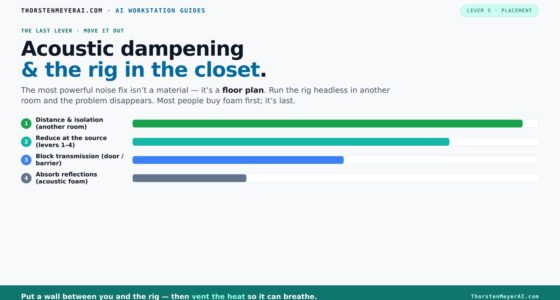
Building or buying isn’t just about hardware specs. It’s about how well your system stays cool, quiet, and stable under heavy loads. That’s where the five levers come in: undervolt the GPU, match the cooler, optimize airflow, tune fans, and position the machine.
When you buy prebuilt, the vendor pulls these levers for you. They validate thermals and noise, often test the system under load, and include cooling solutions that keep the machine quiet and cool. For more insights, visit nailcarehub.com. For example, BIZON claims their systems run up to 30% cooler and quieter, thanks to factory tuning.
If you build, you control every lever. You can select a quiet GPU, choose a custom cooler, and set up airflow precisely for your space. That means more work upfront but a machine tailored exactly to your environment.
As an affiliate, we earn on qualifying purchases.
When to buy an AI workstation: speed, support, and risk reduction
If your priority is getting up and running fast, buying a prebuilt is the way to go. It’s plug-and-play, with the OS and AI stack (like CUDA, PyTorch, TensorFlow) preinstalled. You can start training models within hours instead of weeks.
Plus, reputable vendors validate thermals and provide warranties. That means if something goes wrong, you’re covered — no need to troubleshoot hardware or worry about compatibility. For instance, Lambda and Puget Systems run extensive burn-in tests, reducing your operational risk.
This route is perfect for teams working on time-sensitive projects or startups wanting rapid deployment without the hassle of sourcing components and tuning manually.
As an affiliate, we earn on qualifying purchases.
When building makes sense: control, customization, and long-term learning
Building your own AI workstation gives you full control over every component. If you want to explore more about customizing hardware, check out this guide. Want a specific GPU combination? Or a custom cooling setup? Building allows you to tailor the system for your exact workload.
It’s also a chance to learn — you understand your hardware inside out, which makes troubleshooting and future upgrades easier. For related tips, see minusred.com. For example, if you’re fine-tuning a model that needs a unique GPU stack, building might be your best bet.
However, it takes time, patience, and some technical skill. And with current component shortages, finding the right parts without paying a premium can be challenging.
Comparison table: build vs buy in 2026 — what really matters
| Factor | Buy a Prebuilt | Build Your Own |
|---|---|---|
| Cost (initial) | Often comparable or lower due to bulk buying | Usually cheaper only if you source parts smartly |
| Time to deployment | Minutes to days | Weeks to months |
| Thermal validation | Factory-tested, supported | You tune and troubleshoot |
| Customization | Limited, based on vendor options | Full control over every part |
| Support & warranty | Vendor-provided, often multi-year | Self-managed, unless you buy support |
| Long-term flexibility | Dependent on vendor ecosystem | High, but requires maintenance |
Who should build, who should buy? Match your needs to your skills and goals
If you’re a hobbyist, student, or small team that loves tinkering, building might be your best choice. You get to learn, customize, and save money—if you have time and skills.
For professionals and organizations that need fast deployment, reliable support, and validated hardware, buying makes more sense. Especially if your workload is critical or complex, trust the vendor’s testing and warranty.
Hybrid approaches are also common — buy a solid prebuilt system and customize it further with better cooling, additional storage, or software tweaks. It’s a smart middle ground.
Top tips for making your decision in 2026
- Always compare current prices for your exact specs — what was cheaper last year might not be now. For more tips, visit letsloveothers.com.
- Factor in your time and support costs — building takes time and troubleshooting.
- Consider your need for control — are you tuning for performance or just getting work done?
- Think about long-term upgrades and maintenance — building gives flexibility but adds responsibility.
- Don’t forget supply chain realities — shortages and price spikes favor buying from established vendors.
Frequently Asked Questions
Should I build or buy an AI workstation?
It depends on your timeline, skills, and workload. If you need quick deployment and support, buying is usually best. If you want full control and customization, building might be worth the effort.Is a prebuilt AI workstation worth it?
Yes, especially if you value validated thermals, warranty coverage, and fast setup. It reduces the risk of compatibility issues and saves you hours of troubleshooting.How much more expensive is a custom build really?
With current shortages and rising component prices, a DIY build can cost as much or more than a prebuilt. Always compare prices for your specific specs before deciding.What performance do I lose by buying prebuilt hardware?
Generally, none. Reputable vendors tune their systems for optimal thermal and power performance, sometimes even better than DIY setups, thanks to factory validation.Which GPU, RAM, and storage specs matter most for AI work?
Prioritize high-end GPUs with plenty of VRAM (like 24GB RTX 4090), fast DDR5 RAM (32GB+), and NVMe SSDs for quick data access—these are critical for training and inference.Conclusion
In the AI era of 2026, the choice to build or buy isn’t just about saving money — it’s about what suits your timeline, control needs, and workload. The smart move often depends on balancing speed against customization.
Remember, the best system is the one that gets you to your AI goals fastest and most reliably. So, next time you’re faced with this choice, weigh the tradeoffs carefully — and don’t forget to imagine the moment you finally hit "start" on your new AI rig, whether built or bought.